Your phone’s battery wears out on a schedule you can actually see now. Since iOS 17.4, iPhones report cycle count and peak performance, and battery health settings surface the same readout Android flagships have shipped for years. The wear is real but not linear; the first 300 cycles are the honeymoon, and the slowdown after 80% capacity is why "battery dies faster every year" feels true.
What actually kills a lithium-ion battery?
The chemistry is exhaustion, not magic. Every cycle grows compounds on the electrodes and a thin, insulating layer that quietly blocks lithium ions, which is why capacity drifts down in a gentle S-curve, not a cliff. Speed of capacity loss depends mostly on temperature and how deep the discharge goes. Keep a phone in a parked car in July, and you skip the curve's late part quickly.
The two levers users control, temperature and depth of discharge, cover roughly 60% of avoidable wear. Quick-charging a bone-dry phone on a hot dash is about as high-stress as battery life gets; the opposite, keeping a cell parked at 20%-80%, gets you measurably more lifetime out of most chemistry.
Why then did my phone last longer at 90% than at 60%?
No consumer product wears that simply, because the phone hides the curve. Software shows battery capacity until about 85%, then reports a round 80% to the monitoring bundle, so the drop between 100% and 80% looks like falling off a cliff. Then the OS throttles processing to stop the voltage collapse, and the phone finally feels slow and shorts-lived at the same time.
Battery health is a battery that knows it sold you a bundle of promises and is now running a clock on them.
— Savviest teardown notes, 2026
When does Battery Health actually matter?
- Below 100% (brand new) shows the factory ceiling you negotiate from.
- 98%-90% — normal S-curve; strategy does not change until under 85%.
- Under 80-85% — Apple labels it "service" and throttles to hold minutes.
- Under 70% — genuine fixes: replace the battery or the habit.
That ladder is the practical importance ranking per OEM documentation. Most phones only flood you with pain below 82%, and by then the battery case is the cheaper fix than a new phone for 80% of people.
Does fast charging wreck your battery?
Fast charging alone is mild; fast + hot + fully drained + fully refilled is the killer. Test data shows the extra heat of a 65W charge is measurable but small at moderate temperatures, and modern phones manage the thermal ceiling aggressively. The real cost of fast charging is user habit: gadgets plugged overnight stay 100%-hot, and that stays the worst single practice.
The 2026 flagship tip: cut peak charge to 80% for overnight, use the phone dual-phase it handles, and skip the car charger in summer. That does not require a martyr lifestyle, it requires changing two settings once.
Does wireless charging damage batteries more?
Wireless pushes more heat through the back of the phone than wired, which shortens predicted lifecycle by a few percentage points in lab tests, but most of that is offset by the 7.5W-15W peak, heating as much as the coil. The listed device on the nightstand that sleeps on a QC coil is the one to worry about, not the 30-minute pad you try on the desk.
| Charging style | Heat | Impact |
|---|---|---|
| Wired slow (5-10W) | Low | Easiest on the cell |
| USB-PD 30-65W | Moderate when cool | Fine, avoid 100% parking |
| Wireless 15W | Higher | Coolpad and batching help |
| Overnight to 100% | Low but constant | The wear pattern |
Heat is the through line of the whole table. Same charge count, cooler cell: better capacity across the year. That is why the cheap plastic-window case and the midday sun are bigger battery killers than the charger in order.
Should I replace the battery or the phone?
Apply the rule of 80: if your phone is under 84% capacity and otherwise healthy, the battery swap is usually $49-$99 and restores the day-long life. If the phone is six years old, the software window closed and a $2,000 flagship sized down, or the cameras are hopeless, upgrade. The pivot for most people is: battery is soil, phone is water, upgrade only when the hero of those is broken.
A service center battery in 2026 costs the price of two months of cake and returns a phone that behaves like launch week. The refurbished market makes it even better: many resellers now swap the battery before listing, which is the single highest value indicator in a secondhand phone.
Signs it is time to service the battery
- Phone dies at 15%-20% unprovoked (voltage collapse).
- Battery health app or iOS readings drop through 84%
- Charging trembles up and down or turns slow randomly.
- The back plate feels warm for no reason; that is the expand warning.
- Full charge time doubled versus the launch season.
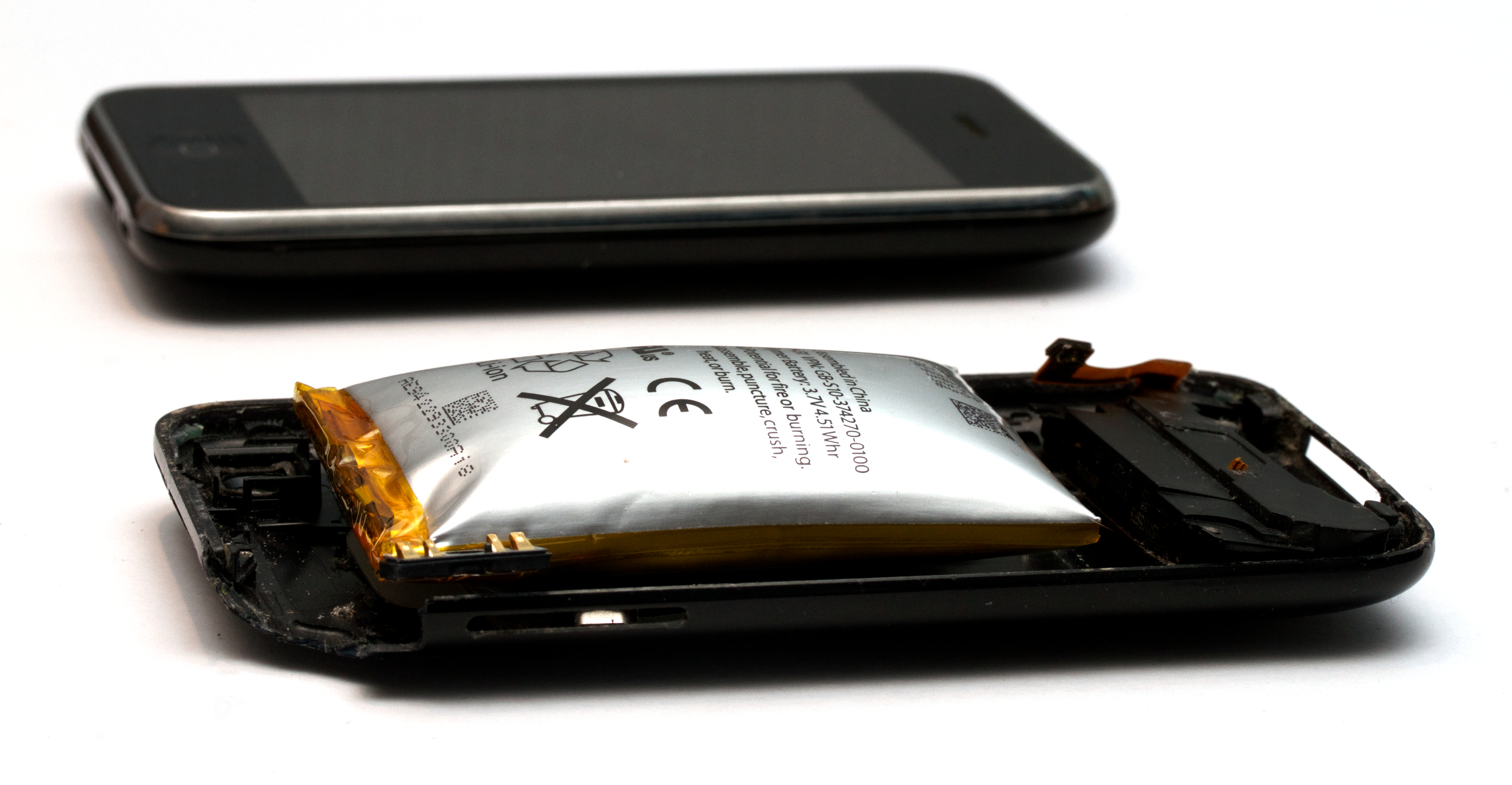
The puffy case is the serious one. If the back panel visibly bulges or the phone no longer lies flat, stop charging it and replace the battery. A swollen lithium cell is not a cosmetic bug; it is a pressurized pouch of broken chemistry, and it is the one battery symptom that should end the phone’s night stand duty.
Why the phone’s "maximum capacity" drops in steps
The percentage you see is a rounded estimate, not a precise lab read. The OS samples the cell’s voltage curve and its charge throughput, then reports the capacity in big steps, so you will watch it sit at 97% for months and then fall two points in a week. That is normal; the mechanism is not "suddenly dying," it is discretization of a slow loss (Apple battery page, 2026).
The consequence is psychological, not technical. Users treat the step-down as a bad sign and panic-replace a healthy battery, or they ignore the number entirely. The better habit is to read the trend across six months, not the single-snapshot digit, and compare the number against the phone’s reported cycle count. A phone at 90% with 600 cycles has worn normally; the same 90% with 250 cycles is a unit to service.
How much does cold weather actually matter?
Cold does not damage a lithium cell in the same way heat does, but it hides it. At sub-freezing temperatures, ions slow down and the phone reports a phantom percentage drop, 15% gone after a ten-minute walk in the snow, returning once the phone warms again. That is why phones "die" fast in winter without actually losing real capacity, and why a flat battery after a ski run is a temperature event, not a chemistry failure.
The mitigation is behavioral: keep the phone mostly warm and in a chest pocket for the brief outdoor leg, and avoid hammering it with maps and cameras at the same time it is freezing. If the phone is warm to the touch while the outside air is freezing, the battery management systems are doing exactly the job they were designed for.
How the "80% charge limit" setting actually works
Modern phones ship a battery charge hardening feature that stops the cell at around 80% instead of 100%, and Apple’s documentation is explicit that keeping the cell in the 20-80% window reduces what it calls "battery aging" relative to constant full cycles (Apple, 2026). The trade-off is effort: you give up the last fifth of your range most days to earn more total months of usable capacity.
When to use it depends on rhythm. For a phone you charge overnight and drain to 15% at the office, the 80% cap is pure honesty: you rarely need the top fifth, and the cap buys the S-curve later. For a traveler who demands the full range in a hotel, turn the cap off and pay by carrying a battery bank. The setting is a dial, not a rule.
The battery tests that measure a phone honestly
Review sites judge batteries on a controlled video-loop runtime at a fixed brightness, which is a decent comparator but not your life: a sustained brightness, background cellular, and predictive cold will all shave it. The useful number for your purchase is the "hours of real screen time at moderate brightness" in the review summary, not the narrative of "lasted all day" under lights-off (independent battery tests, 2026).
If you are shopping as a battery-first buyer in 2026, read the "manual" spec and the reviewer’s five-hour loop, multiply by your own usage pattern between 15% and 30%, and add the charging speed ceiling. The battery that wins is not always the one with the biggest number, it is the one that fits the worst day you actually have.
Key takeaways
- Capacity wears in an S-curve; the last 20% is throttled and slow.
- Heat and 100% parking, not charging speed, cost the most longevity.
- iOS 17.4+ and Android flagship settings show health in plain English.
- The 80-84% reading is the practical service battery flag.
- Cell swap at $50-150 beats a new phone for most devices under 4 years.
Frequently asked questions
How fast should a phone battery degrade?
Quality lithium cells keep 90%+ capacity then calm until ~2 years of use; riders to 80% at the 3-year mark are normal. Faster is heat or parking at 100%.
Does fast charging damage the battery?
Mild undercool slavery heat; the chronic damage is name uses: overnight to 100% at moderate. Use stop at 80% and shutdown the mess.
When should I replace my phone battery?
Replace when your OS read shows under 84% or the phone dies at 20%+. Most healthy phones are worth a $49-$150 swap over a new $1,000 phone.
Is 80% battery health a big deal?
It is the OEM service line: below that, OSes throttle and charge drops. Swapping at 80-85% gives the cleanest reset.
- Apple battery health and performance explained
- The 2026 memory crisis raising phone prices
- Smartphone memory shortage, explained
- Solid-state batteries finally shipping status
Bottom line
If you are shopping as a battery-first buyer in 2026, read the "manual" spec and the reviewer’s five-hour loop, multiply by your own usage pattern between 15% and 30%, and add the charging speed ceiling. The battery that wins is not always the one with the biggest number, it is the one that fits the worst day you actually have.
What we still don't know
This is a fast-moving story. We update the post as new facts land — and we'll flag it when we do.
Enjoyed this? Pay it forward
A sharp story is worth passing on. Share it with the people who read tech like it matters.